

Up to four Reference Views
Keep supported browser, document, PDF, video, chat, dashboard, and other app windows visible while you work. Free supports up to two views; Unlimited supports up to four.
Keep the windows you need visible while you work.
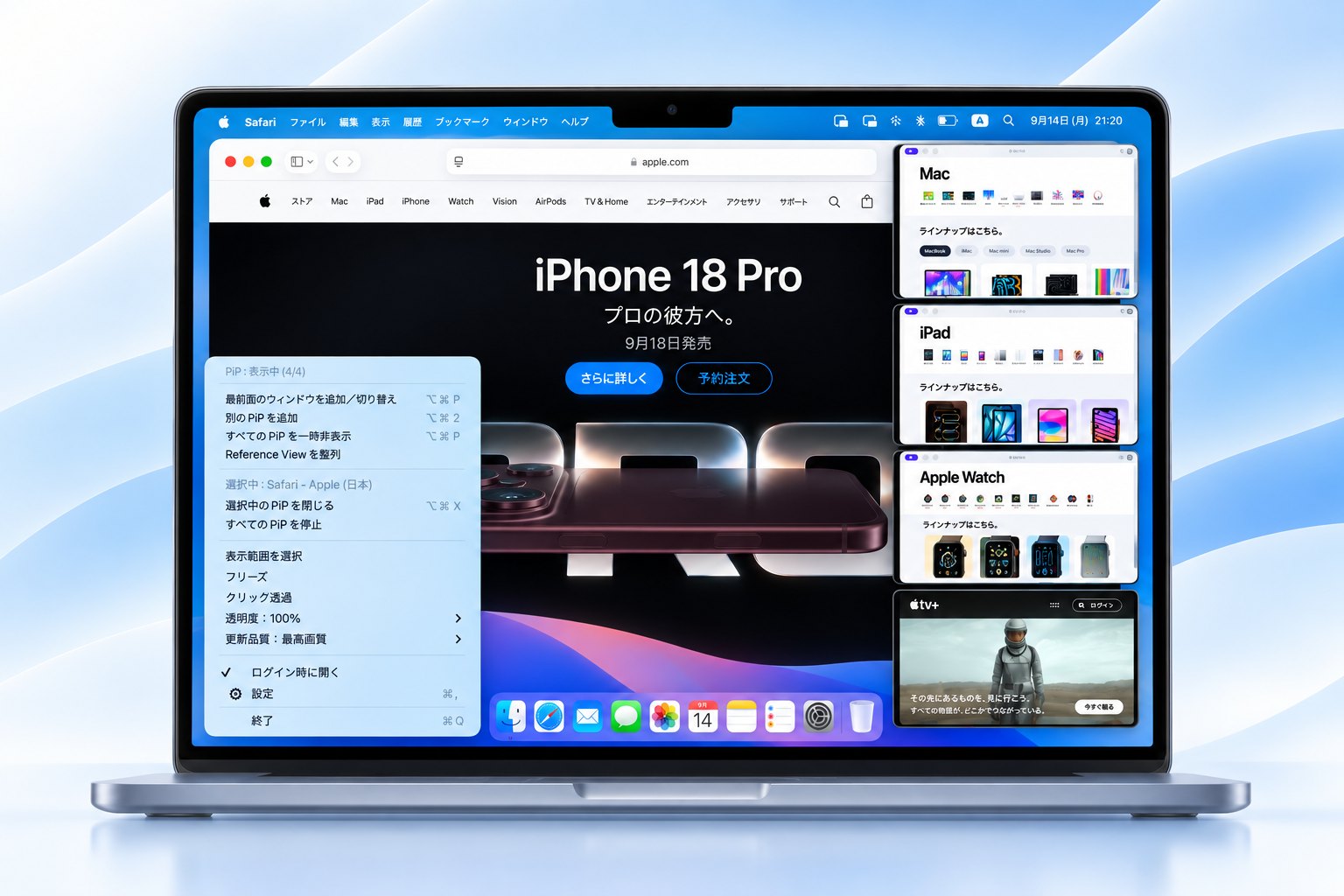
Pocket Screen creates separate, resizable, always-on-top Reference Views from supported Mac app windows while the originals stay in place. Free supports up to two views; Unlimited supports up to four with no time limit.
Keep supported browser, document, PDF, video, chat, dashboard, and other app windows visible while you work. Free supports up to two views; Unlimited supports up to four.
Create more than one Reference View from the same supported source window when you want to keep different areas of one source in sight.
The global shortcut (Option-Command-P by default) creates the first PiP, then switches the selected PiP to the current frontmost window. Add Another PiP and Close Selected PiP also have configurable global shortcuts.
Select a region inside a PiP and expand just that area to fill the view. Each PiP keeps its own Focus View state.
Choose Energy Saver, Standard, Smooth, or Ultra without manually tuning resolution or frame rate. Free includes three quality modes; Unlimited adds Ultra.
Each active Reference View can keep its own opacity, quality, Focus View, Freeze, and Click-Through settings.
Temporarily hide all PiPs with Shift plus the primary shortcut, then restore them without losing their source, position, Focus View, freeze, click-through, opacity, or quality state.
Show or arrange Reference Views with shortcuts, move or resize them around your workspace, and keep their placement when you return to your setup.
Pocket Screen uses macOS ScreenCaptureKit to mirror selected windows continuously, including video and other changing content. Captured pixels stay on your Mac.
PiPs hide when their source Space is unavailable and return when the source becomes available again. Placement is preserved across target and display changes.
On macOS 26 or later, an optional setting can ask macOS to exclude PiP windows from supported screenshots, screen recordings, and screen sharing. The setting is off by default.
Pocket Screen requires macOS Screen Recording permission so it can capture the selected window. Captured content is used only for the local PiP preview.
Start with Free and keep using it with no expiration. Upgrade only when you need longer sessions, more Reference Views, or Ultra quality.
Real-world workflows
Pocket Screen is designed for the moments when one Mac app needs your attention while another contains the information you are working from. A Reference View is a live view of a selected window, not a static screenshot.
Keep a source document or dashboard visible in a Reference View while entering values in a separate CRM window. The source remains available without repeated Command-Tab switching.
Keep a selected app window containing an ongoing process visible while working elsewhere. The view reflects the supported source window; Pocket Screen does not itself run or control the AI task.
Arrange multiple Reference Views side by side. Unlimited supports up to four views, including more than one view from the same source when a task calls for it.
Screen Recording permission is required for capturing the selected window. Availability and performance depend on the source app, macOS, and device. Read setup and troubleshooting or how capture stays local.
Pocket Screen requires macOS 14 or later. It is designed for both Apple silicon Macs and Intel Macs.